Xbox Mode Arrives: Windows 11 Embraces Console-Like Gaming Experience
Microsoft has officially launched 'Xbox Mode' for Windows 11, transforming the PC gaming experience with a console-style interface. This new feature aggregates game libraries, optimizes performance by reducing background tasks, and allows for quick switching to the desktop. Gamers can now enjoy a more streamlined and immersive environment, marking a significant step in Microsoft's strategy to unify its gaming ecosystem across platforms.
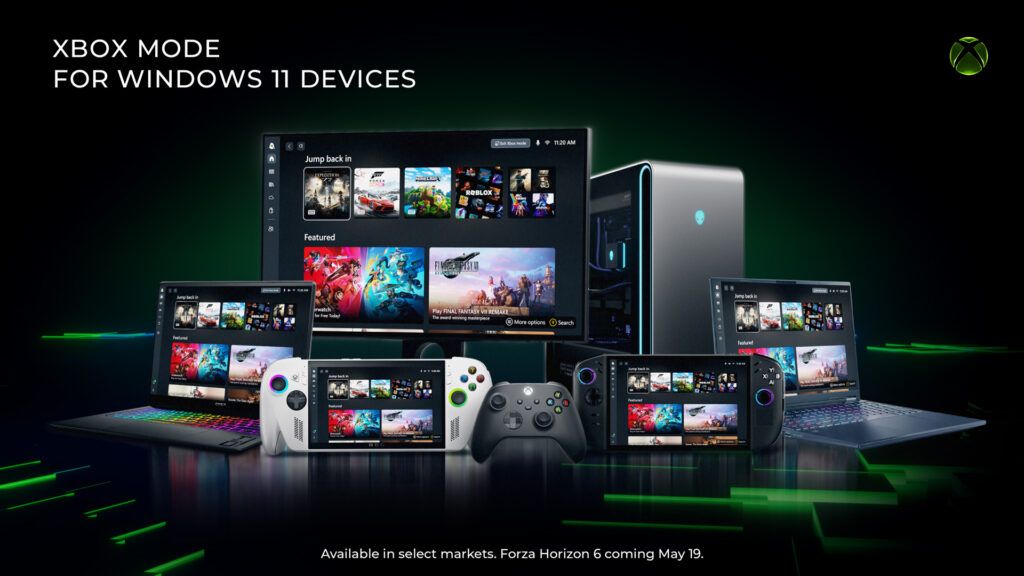
The lines between console and PC gaming have long been blurred, but Microsoft has just taken a decisive step towards erasing them entirely. After much anticipation and a slightly delayed rollout, Xbox Mode has officially arrived on Windows 11, promising a dedicated, console-like experience directly on your desktop PC. This isn't merely a cosmetic update; it's a fundamental shift in how Windows interacts with gaming, designed to offer a more immersive, optimized, and streamlined environment for players.
For years, PC gamers have juggled launchers, managed background processes, and navigated the traditional Windows desktop to get into their favorite titles. While the flexibility of PC gaming is undeniable, the immediate, 'pick up and play' simplicity of a console has often been a coveted ideal. Xbox Mode, previously known as the Xbox full-screen experience, is Microsoft's ambitious answer to this desire, rolling out in phases to Windows 11 users worldwide. It represents a significant milestone in the company's broader strategy to integrate its gaming services and hardware, making the PC an even more integral part of the Xbox ecosystem.
The Genesis of Xbox Mode: A Vision for Unified Gaming
The concept of a dedicated gaming mode for Windows isn't entirely new. Microsoft has experimented with various optimizations and game-centric features over the years, from the rudimentary 'Game Mode' in earlier Windows iterations to the more robust Xbox app integration. However, Xbox Mode elevates this ambition to a new level. The core idea is to provide a focused, distraction-free gaming environment that mimics the simplicity and performance-first approach of a dedicated gaming console. This means aggregating all your games – whether from Steam, Epic Games Store, Xbox Game Pass, or other launchers – into a single, intuitive interface. The goal is to eliminate the need to hunt through folders or open multiple applications, presenting a unified library that's instantly accessible.
This initiative comes at a time when cloud gaming is gaining traction and cross-platform play is becoming the norm. Microsoft's investment in Xbox Game Pass, its cloud gaming service, and its commitment to making Xbox titles available on PC underscore a strategic pivot. By bringing a console-like experience to Windows, Microsoft is not just catering to existing PC gamers but also potentially attracting console players who might be hesitant to transition to the perceived complexity of PC gaming. It's about offering the best of both worlds: the power and versatility of a PC combined with the ease of use typically associated with consoles.
Under the Hood: Performance and User Experience
What truly sets Xbox Mode apart from previous attempts is its multi-faceted approach to optimization. Beyond the sleek new interface, the system is engineered to deliver tangible performance benefits. One of the most critical aspects is its ability to reduce background tasks and system resource consumption. When Xbox Mode is active, Windows 11 intelligently prioritizes gaming processes, minimizing the impact of non-essential applications and services running in the background. This can translate directly into higher frame rates, smoother gameplay, and reduced input lag – crucial factors for competitive and immersive gaming experiences. While specific benchmarks are still emerging, the promise of a more efficient system is a significant draw for performance-conscious gamers.
Key features of Xbox Mode include: * Aggregated Game Libraries: A single dashboard to view and launch games from various platforms. * Performance Optimization: Automatic reduction of background processes to free up CPU and GPU resources. * Quick Desktop Switching: Seamless transition between the Xbox Mode interface and the traditional Windows desktop, allowing users to multitask without fully exiting their gaming session. * Integrated Xbox Services: Direct access to Xbox social features, Game Pass, and cloud saves. * Customizable Interface: Options to personalize the look and feel of the gaming environment.
The user experience is central to Xbox Mode's design. The interface is clean, intuitive, and designed to be navigated easily with a controller, mirroring the console experience. This focus on controller-first interaction is a clear signal of Microsoft's intent to make PC gaming as accessible and comfortable as console gaming. The ability to quickly switch back to the desktop is also a thoughtful addition, acknowledging that PC users often need to access other applications without fully interrupting their gaming session.
Expert Analysis: Implications for the Gaming Ecosystem
Industry analysts view Xbox Mode as a shrewd strategic move by Microsoft. "This isn't just about making Windows a better gaming platform; it's about reinforcing the Xbox brand and ecosystem," says Dr. Emily Chen, a technology analyst specializing in gaming. "By offering a seamless, console-like experience on PC, Microsoft is effectively expanding its console footprint without selling more Xbox hardware. It makes Game Pass even more attractive and blurs the lines between their console and PC offerings, creating a more unified and sticky ecosystem for users." This integration could also pave the way for future innovations, such as deeper cloud gaming integration or even more sophisticated AI-driven performance enhancements.
The timing of this rollout is also noteworthy. With the gaming market becoming increasingly competitive, and platforms like Steam Deck offering portable PC gaming experiences, Microsoft is positioning Windows 11 as the ultimate gaming hub. The success of Xbox Mode will depend not only on its technical performance but also on its adoption by the vast PC gaming community. Initial reactions have been largely positive, with many gamers appreciating the effort to streamline their experience and optimize performance.
The Road Ahead: Challenges and Opportunities
While the launch of Xbox Mode is a significant achievement, challenges remain. Ensuring compatibility with the myriad of PC hardware configurations, optimizing performance across a diverse range of games, and continuously refining the user experience will be ongoing tasks for Microsoft. Furthermore, convincing long-time PC gamers, who are often accustomed to a high degree of customization and control, to embrace a more curated experience will require sustained effort.
However, the opportunities presented by Xbox Mode are immense. It has the potential to attract a new generation of gamers to the PC platform, simplify the gaming experience for existing users, and further solidify Microsoft's position as a dominant force in the global gaming industry. As technology continues to evolve, the distinction between different gaming platforms will likely become even less pronounced. Xbox Mode is a bold step in that direction, signaling a future where gaming is less about the device you play on and more about the immersive experiences you can access. The era of the console-like PC is truly here, and it promises to reshape the landscape of digital entertainment for years to come.
Stay Informed
Get the world's most important stories delivered to your inbox.
No spam, unsubscribe anytime.
Comments
No comments yet. Be the first to share your thoughts!